
Export Game (game.html)
Export Game (game.html) writes your entire game - scene, meshes, textures, materials, scripts, and the engine itself - into a single, self-contained HTML file you can double-click to play or upload anywhere.
There are no sidecar files, no asset folder, and no server requirement. Everything the game needs is inlined into one game.html: the player runtime as a classic <script>, the scene as a base64 blob, and the compiled behaviours as globals. Hand someone the file over email or drop it on itch.io and it just runs.
This page walks the full build, step by step, because understanding what gets baked in explains both the file's size and its one operational dependency (a pre-built player template).
The build pipeline
Export Game runs buildGameHtmlAsync, which shares the whole payload path with Preview and differs only at the final delivery step.
1. Grab the save location first
A big scene's encode can take longer than the browser's ~5-second user-activation window, after which showSaveFilePicker would throw. So the editor asks where to save immediately when you click the menu item, while the click is still "fresh", then does the heavy work. On Chromium you pick a filename up front; on other browsers the file is downloaded at the end instead.
2. Collect only the used assets
An imported asset pack can hold hundreds of meshes and textures you never placed. Shipping all of them would bloat game.html and can even blow past V8's ~512 MB string limit. So collectUsedAssets walks the shippable graph - the open world, every named scene in the library, every prefab, and material presets - and gathers only the assets actually referenced:
- Meshes / textures referenced by a
MeshRenderer, aCollidershape, or a material. - Animation clips, skeletons, and skins the scene actually plays - a character's Animator clip + skeleton, and every clip bound on its AnimStateMachine. Baked clips are dense per-bone-per-frame data, so this matters: scrubbing through an animation pack in the inspector's preview bakes each clip you look at into the project, and those preview bakes used to ride into every export. Now only the clips your characters bind are shipped.
Everything else is left out.
A few asset kinds are not used-filtered - they ship whole, because they are small and have no engine fallback that could put them back:
- UI animation clips (UIClip) and imported fonts ride along in full. Fonts ship base64 alongside the textures; the player registers each as an
@font-faceso aUINode'sfontfield renders in the pack's typeface, and aUIAnimatorplays a shipped clip. - Particle-effect blueprints ship the same way the scene library does: authored/inspector effects are carried, effects from an imported pack are dropped (like unplaced prefabs).
A clip you play only from a script
If a script calls api.playClip("someClip") on a clip that is not bound on an AnimStateMachine (and isn't the Animator's clip), the filter can't see it, so it won't ship - it would no-op to bind pose in the game. Bind such clips on the graph (or set them as the Animator's clip) so they're included.
You can see the mesh/texture split live in the Viewport stats overlay, which reports "used" bytes (what an export bakes) separately from "total" resident bytes.
3. Compact the scene graph
compactSceneForShip slims the scene JSON by dropping component fields that equal their defaults and rounding floats - the player backfills defaults on load, so this is lossless for the game. On a large scene the graph metadata is a big chunk of the bytes; this is where it shrinks. Project saves are never compacted - only exports.
4. Encode textures
Only textures the game actually uses, and only raw-RGBA ones, are re-encoded for shipping (already GPU-compressed textures are skipped - they cannot be canvas-encoded, matching what the editor viewport displays). Each is encoded by role:
- Albedo → WebP (lossy, small).
- Normal / mask → PNG (lossless, so surface detail is exact).
The role travels with each texture so the player uploads normal/mask maps as linear, not sRGB.
5. Compile behaviours to IIFEs
Your TypeScript scripts are compiled ahead-of-time so the shipped game needs no TypeScript compiler. Each runtime script becomes an IIFE that registers its default-exported class onto a global:
js
window.__AWAKEN_BEHAVIORS__ = {};
try {
  (function () {
    /* compiled script code */
    window.__AWAKEN_BEHAVIORS__["<scriptId>"] = __forgeBehavior.default;
  })();
} catch (e) {
  console.error("[awaken] script <scriptId> failed", e);
}
Four important details:
- Editor-only scripts and plugins are stripped. Any script whose
kindis"editor"or"plugin"is an editor concern and is never compiled into the game. See Editor-Only Scripts. - Baked, not compiled at runtime. The player prefers these precompiled behaviours over compiling TypeScript, which is what lets
game.htmlrun fromfile://with no compiler onboard. - Modules ship as binaries, never as compiled script. A wasm module's source is AssemblyScript or C, and compiling it here as TypeScript produced a library namespace registered under the very id the wasm dispatch answers to, so an importing script could bind to nonsense. Module binaries ride along base64'd in
window.__AWAKEN_MODULE_WASM__instead. - Libraries are emitted in dependency order, and publish immediately. A TypeScript library is linked in-process, so the scripts importing it bind its namespace at module scope - as their own script tag parses, long before the player boots. Its script tag therefore registers straight into the runtime's own registry (
globalThis.__awaken_set_script_ns) rather than onto awindowbag the player would install later. Emitting it any other way makes a correct compile order fail as "imported before it compiled".
What a game does not carry
A feature the game does not use costs it nothing it can avoid:
- Physics wasm is stripped when no scene, prefab or scene-library entry declares a collider or rigidbody. That is Rapier's ~2.2 MB, and the player logs the omission once so a physics-free build says so rather than failing silently.
- Importer code is tree-shaken out.
@awaken/assetshas two entries, and only the runtime one is reachable from a shipped game.npm run size:playerscans the built bundle for banned paths so importer code cannot drift back in. - Shader-graph node functions are emitted per material, so a material that calls none carries none.
Minification and obfuscation
Shipped scripts are always minified (esbuild - locals renamed, whitespace and comments stripped), so the game never carries readable source. You can additionally obfuscate them, chosen per project in the Export game dialog (the choice persists in the .awaken file). It applies only to your game scripts - the engine is never obfuscated (it's open source, and it runs every frame).
| Level | What it does | Runtime cost |
|---|---|---|
| None (default) | Minified only. Compact, but readable in devtools / view-source. (Minification already renames locals - renaming is free; it's what None gives you.) | No added cost |
| Light | Identifiers renamed and strings moved into an encoded lookup table - unreadable to a snooper. Control flow is unchanged. | Small per-frame cost - each string literal becomes a decoder call, so hot code that touches many strings per frame pays for it |
| Heavy | Adds control-flow flattening + dead-code injection - each function becomes a state-machine dispatcher, much harder to follow. | Larger per-frame cost (onUpdate runs through a dispatcher every call) |
There is no "free but obfuscated" tier: plain minification (None) is already the free renaming, and real obfuscation - hiding strings (Light) or logic (Heavy) - always adds per-access work. On a script-heavy per-frame controller, expect roughly Light ≈ 3–4× and Heavy ≈ 20× the None script time (still sub-millisecond for typical scripts, and negligible in file size next to meshes/textures). Both levels preserve the runtime contract - method names (onUpdate) and inspector-configured fields still resolve.
Per-script override
The dialog level is the project default. Because obfuscation cost is wildly uneven - a quest or dialogue script costs ~0 ms/frame at any level, while a tight per-frame loop (a cloth or particle sim) can pay several milliseconds under Heavy control-flow flattening - a single project-wide level forces a bad trade: either your hot script eats the cost, or your valuable logic ships readable.
So each script can override the default. Open a script in the Code panel and pick its level from the Obfuscation dropdown next to Compile:
- Inherit (default) - use the project level. Behaviour is identical to having no override.
- None / Light / Heavy - force that level for this one script, whatever the project default is. An explicit None wins over a Heavy project default - that's how you exempt a hot sim.
The override travels with the script (saved in the .awaken project and in an exported .awakenscript). This pairs with the Debug overlay's per-script timing: run a Debug preview, see which script is expensive, open it, and drop just that one to None - leaving everything else fully obfuscated.
📸 Screenshot - save as img/shipping-script-obfuscation-override.png
The Code panel's per-script Obfuscation dropdown (Inherit / None / Light / Heavy) next to the Compile button.
Deterrence, not security
Client-side JavaScript is always recoverable - it runs in the player's browser. Obfuscation raises the bar against casual copy-paste; it never truly hides code. Don't put secrets, API keys, or licence / anti-cheat checks in shipped scripts and expect them safe.
📸 Screenshot - save as img/shipping-export-obfuscation.png
The Export game dialog's obfuscation radio group - None / Light / Heavy, each with its one-line explanation.
6. Pack the binary container
encodeSceneContainer builds a compact, glTF-.glb-style binary blob: a small JSON metadata chunk (scene graph, prefabs, scene library, materials, render settings, skeletons + baked clips, particle effects, UI animation clips, and base64 textures + fonts) followed by one binary blob holding every used mesh's geometry - quantized, not base64. (Scripts are not in the container - they ride along as the separate behaviour globals from step 5.)
- Positions →
Uint16over the mesh AABB - Normals → octahedral
Int8 - UVs →
Uint16over the UV bbox - Indices →
Uint16when the mesh has < 65 536 vertices, elseUint32
Storing geometry as raw quantized bytes (roughly 32 → 12 bytes per vertex) means the next step's compressor keys on real byte patterns instead of fighting base64's 4/3 inflation. Meshes dequantize back to Float32 at load, so the renderer's vertex layout is untouched. The container carries its own version tag in its 12-byte header (currently 1), and the scene metadata inside carries SCENE_FILE_VERSION (also 1); see Data Formats.
7. Compress once with Zstd
The whole container is compressed with Zstd at level 19, run in a Web Worker (state/zstdWorker.ts) so the ~20-second, CPU-bound pass never freezes the editor. Zstd is the real size win here: its compression window is measured in megabytes versus gzip's 32 KB, so it catches redundancy across the whole scene - repeated quantized geometry between similar props - that gzip misses. The progress dialog shows a ticking Compressing… (Ns) heartbeat while it runs. The player decompresses with fzstd, a pure-JS decoder that works from file://.
NOTE
Meshes dominate an exported game's size; textures are comparatively negligible once WebP-encoded. The biggest lever on game.html size is geometry - fewer/simpler meshes and shared geometry compress far better than any texture tweak.
8. Inline and stamp into the template
The compressed container is base64-encoded and injected, together with the behaviour globals, just before </head> of the player template:
html
<script>window.__AWAKEN_SCENE_BIN__="…base64…"</script>
<script>window.__AWAKEN_BEHAVIORS__={}; /* baked scripts */</script>
The result is written to your chosen file (or downloaded as game.html). On boot the player finds __AWAKEN_SCENE_BIN__, base64-decodes it, inflates it with fzstd, and decodes the container - all in-browser, no network, file://-safe.
Watching the size story
Every game.html / folder export ends on a size story: one bar per stage of the pipeline above, so you can see exactly where the bytes go. The payload grows as assets are gathered - raw Float32 geometry, then the scene JSON, then full raw-RGBA textures (the assembled peak) - then shrinks through each optimization: scene Compacted, textures Encoded, geometry Quantized, and the whole container Compressed. The final bar is your shipped size.
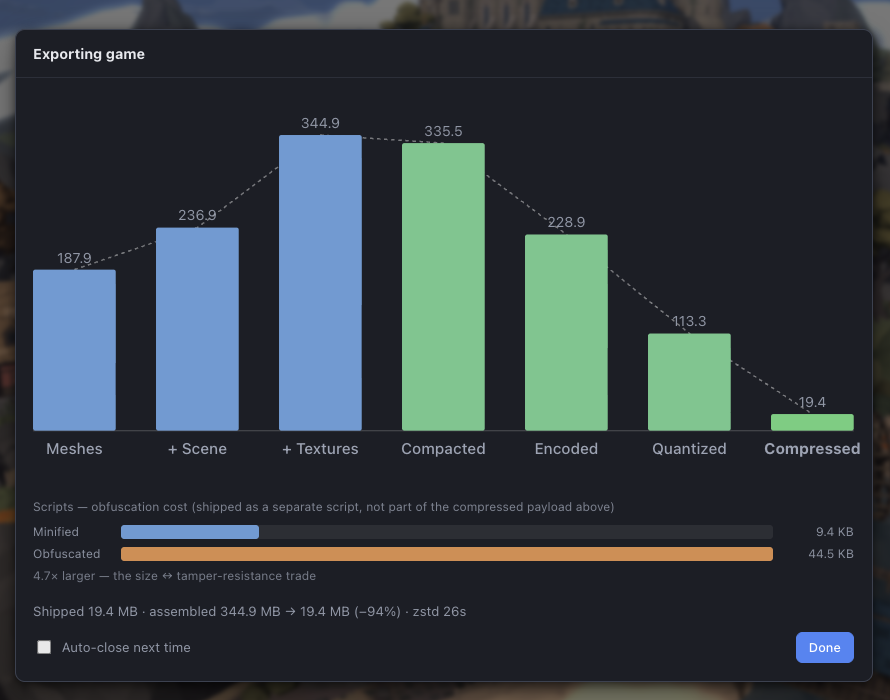
Because the whole pipeline is known in advance, every bar's slot is laid out and the scale is locked to the peak up front - nothing rescales or reflows as the export runs, each bar just fills into place as its step completes. Hover any bar for its size, the change from the previous stage, and a note on what that step did.
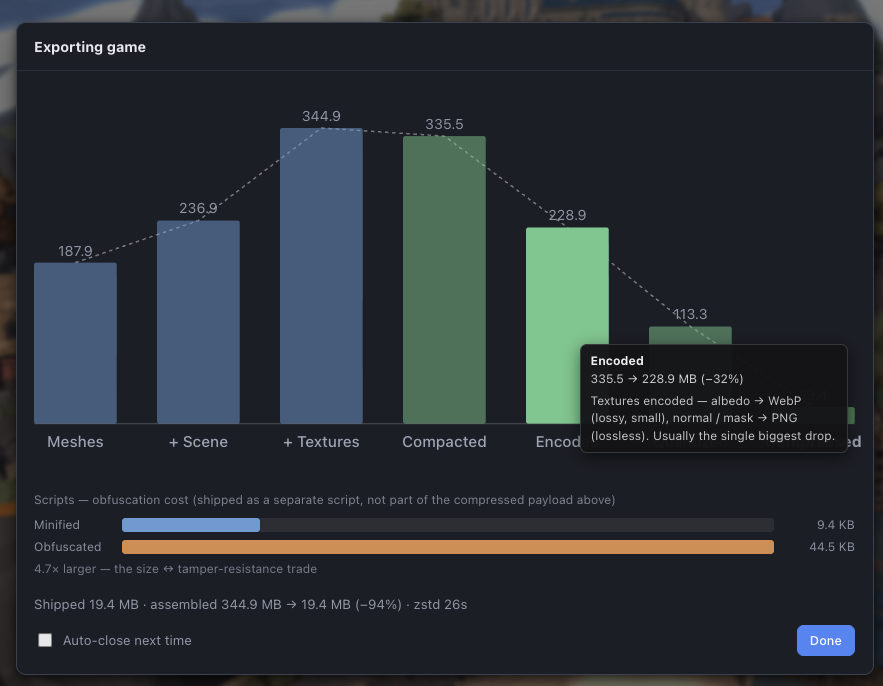
Two things ride along under the chart:
- Scripts - obfuscation cost. Your compiled scripts ship as a separate
<script>(not inside the compressed container), and at KB against MB of meshes their size can't register on the main bars. So when obfuscation is on, a small self-scaled comparison shows minified vs obfuscated - you can see the trade directly (e.g.9.4 KB → 44.5 KB, 4.7× larger). - The dialog holds on this chart until you click Done, so there's time to read it. Tick Auto-close next time to skip the hold on future exports.
📸 Screenshot - save as img/shipping-game-html-file.png
The resulting game.html in a file browser (one file, tens of MB), next to a tooltip or Get-Info panel showing its size - and the same file running when double-clicked.
The player template dependency
game.html is not built from scratch on each export. It is produced by injecting your scene into a pre-built player template - a single self-contained HTML build of the standalone player that lives at apps/assets/player-template.html and is served at /player-template.html. The export fetches that template and does a string-replace to insert your scene before </head>.
The template is generated by pnpm build:player-template (which the top-level pnpm build runs first). That script builds the player with AWAKEN_SINGLE=1, rewrites its module script to a classic script (so it runs from file://), strips the favicon links, and fails loudly if any <script type="module"> survives.
The stale-template gotcha
WARNING
The exported game.html embeds a pre-built player template. If you change engine or player code and export without rebuilding the template, your export runs the old runtime - a feature can work perfectly in the editor yet be missing from the exported game.
After any change to the engine (packages/*) or the player (apps/player), run:
sh
pnpm build:player-templateThen re-export. (pnpm build does this automatically as its first step.)
A built editor serves its own copy. pnpm build:player-template writes apps/assets/player-template.html, which the dev server serves directly. A built editor serves apps/editor/dist/player-template.html, produced by the editor build - so rebuilding only the template used to leave the two to diverge silently, with the running editor still handing every export a copy from whenever the editor was last built. The template script now refreshes that copy too whenever it exists.
Every export reports the template's age. The template carries a build stamp, and the Console line after an export or preview names it when it is more than a day old, with the command to fix it. A template with no stamp at all predates stamping, which is itself the stale case, and says so.
Fallback: scene.awaken.json
If the player template has not been built, Export Game cannot produce a runnable single file. Instead it falls back to exporting a scene.awaken.json - the JSON SceneFile (base64 meshes, no engine) that a hosted player build can fetch. You would drop this file beside a hosted player rather than double-click it. The Console message tells you which of the two you got. In normal use, build the template once and you always get game.html.
When to use it
Reach for game.html when you want the simplest possible artifact: one file, no server, works when double-clicked, uploads to any host that accepts an HTML file (itch.io, a static bucket, an email attachment). If you are hosting on a static host and want the smallest download, use Export Folder instead, which keeps the scene as a raw sidecar rather than base64.
See also
- Export Folder (for hosting) - smaller output for served hosting
- Preview - run the same build without saving a file
- The Player Runtime - the template that
game.htmlis stamped into - Data Formats & Versions - the binary container and version numbers
- Build & Player Template - how the template is produced