
Simulations
A Simulation is an asset holding an ordered list of GPU steps that run on the engine's fixed clock and write render textures: a cellular automaton, ripples on water, a diffusing heat map, the positions of 10,000 particles.
The pieces
| Piece | Kind | What it does |
|---|---|---|
| Update graph | asset (a shader graph) | One full-screen pass whose output is written to a render texture: one step of the simulation's rule. |
| Simulation | asset | The ordered steps: update graphs, camera draws, clears and copies, each every step or once on Reset. |
| Simulation component | on an object | Runs one Simulation asset in the scene and binds its camera slots to scene cameras. |
| Texture Probe component | on an object | Copies a window of a render texture back to the CPU after every step, for that object's script. |
api.simulation(entity), api.probe(entity) | script API | Reset, pause and count steps; sample a probed texture in world units. |
The asset model is packages/render/src/simulation.ts, the component simulationComponent.ts, the GPU side simulationRunner.ts, the probes textureProbe.ts. The update-graph compiler is emitUpdateGraph in packages/assets/src/awakenShaderGraph.ts; its output format is CompiledUpdateShader in updateShader.ts.
One fixed step
The fixed clock decides how many steps a frame owes (60 a second by default, at most 5 a frame). Scripts and physics run each step on the CPU during the frame's update; the Simulation's GPU steps for those same step numbers are encoded when the frame is drawn, before any camera draws, so every view samples this frame's result.
Update graphs
An update graph is a shader graph of kind update. It compiles to one full-screen-triangle render pass (draw(3), no depth, no blend) whose fragment output, the graph's Out, is written to the target render texture in the target's own format. One pass covers every texel, so the graph describes what one texel becomes.
Creating one
- In the Shader Editor's shader list, + New Update Graph; in the Asset Browser's Shaders tab, + New Update Graph.
- The new graph is named
update1(or the next free number) and writes the project's first render texture, if it has one. - The graph's Target section has one control, Writes: the render texture Out is written to. A Simulation step may name another. With none chosen, the preview runs into a 128 x 128
rgba16floatstand-in. - If the graph reads Previous and the chosen target is not double-buffered, the section warns: a pass cannot read the texture it is writing.
Nodes for update graphs
Most surface nodes work here too (maths, noise, Sample Texture 2D LOD, subgraphs, Custom Function); the surface-only ones, such as Instance Texel and Vertex Interpolator, do not. These nodes exist for update passes; the first three also work on surfaces.
| Node | Category | Output |
|---|---|---|
| Texel Size | Texel | (1/width, 1/height, width, height) of its Texture input, or, with none, of the target being written. |
| Texel Coordinate | Texel | The integer texel being written, as whole-number floats: 0..width-1, 0..height-1, row 0 at the top. On a surface, the screen pixel. |
| Load Texel | Texel | textureLoad at Coord + Offset (both rounded to integers), no sampler, so it reads every format including r32float. Coord unwired = the texel being written. An out-of-range texel is clamped to the edge or wrapped (the node's address setting: clamp or wrap). With no Texture named, an update pass reads the target's previous contents. |
| Previous | Texel | The target's own previous contents at the texel being written (its front half). Update graphs only; the target must be double-buffered. |
| Pass Index | Simulation | Which repeat of the step this pass is: 0..Repeat-1. |
| Step | Simulation | The Simulation's step count, 0 after a Reset. (The Math node also labelled Step is the edge function.) |
| Fixed dt | Simulation | Seconds per fixed step. |
| Time | Input | In an update pass, seconds since the Simulation started: Step x Fixed dt. |
| Loop | Utility | Runs a subgraph a constant number of times (1 to 64). The subgraph's Index input is the iteration and its Acc input the accumulator, starting at Init; Out is the final accumulator. A blur or a multi-tap neighbourhood is one Loop. |
Sample Texture 2D LOD has a sampler choice per node: linear-repeat (the default), linear-clamp or nearest-clamp. An update pass binds the real sampler; nearest-clamp is the one that reads a 32-bit float texture texel for texel. A filtering sampler on r32float or rgba32float is refused with a message naming the graph and texture.
Graph properties become uniform lanes. A property marked global reads the value a script set with api.setGlobalFloat / api.setGlobalVec, zero when nothing set it.
What a pass binds
Bind group 0 is the whole interface (updateShader.ts):
| Binding | Contents |
|---|---|
| 0 | Uniform block: targetTexel (1/w, 1/h, w, h), passIndex (u32), step (u32), dt, time, then one vec4 lane per property |
| 1..8 | Up to 8 textures (UPDATE_MAX_TEXTURES), Previous included: rt:<id> render textures, gpu:<name> textures, or project textures |
| 9, 10, 11 | The linear-clamp, nearest-clamp and linear-repeat samplers, declared only when used |
A texture with no source picked reads one black texel.
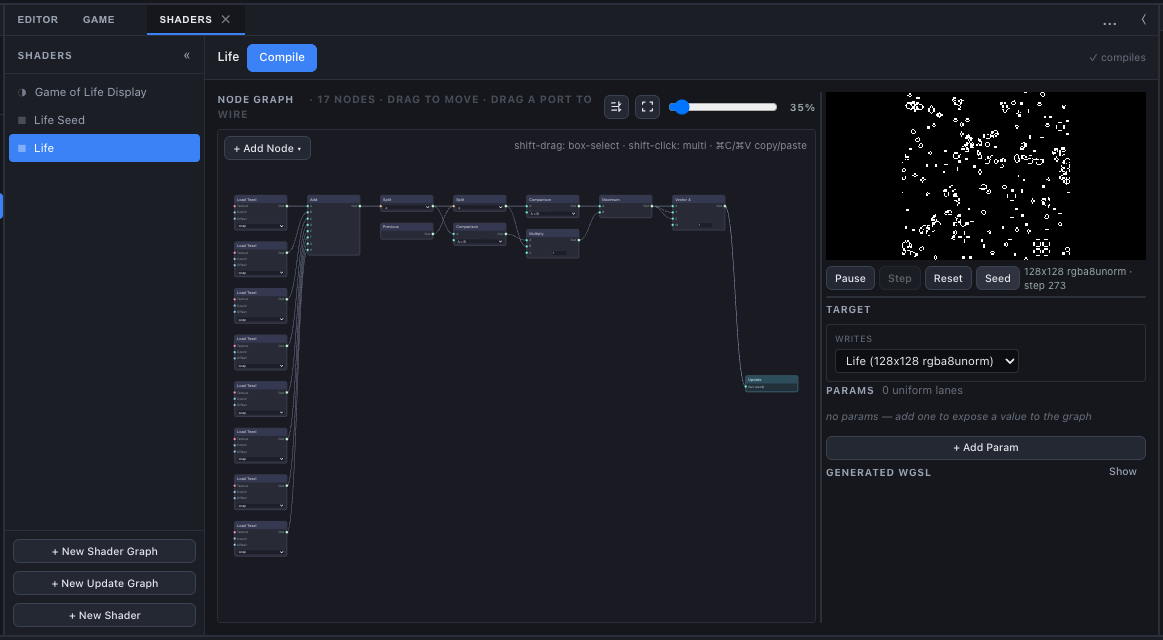
Live preview
The update graph's preview runs its pass every frame into a pair of textures shaped like the target (size capped at 1024, format, clear colour) and shows the front one; r16float and r32float show as grey.
| Control | Does |
|---|---|
| Play / Pause | Run a pass every frame, or stop. |
| Step | One pass (while paused). |
| Reset | Clear both textures to the target's clear colour; step 0. |
| Seed | Fill the front texture with random 0/1 texels (about 35% on), alpha 1. |
The readout shows <w>x<h> <format> · step <n>. The preview runs on the Shader Editor's own validation device, never a viewport's, so it works before any viewport has mounted. Fixed dt is 1/60 there; another render texture it reads is a copy cleared to that texture's clear colour; a project texture is uploaded when it is plain RGBA8; globals read zero.
Simulation assets
A Simulation asset (SimulationDesc) has a name, a list of steps, a list of camera slots and a list of extra textures it owns. Create one with + New Simulation in the Asset Browser's Simulations tab (or All); it opens in the Simulation panel.
Steps
| Kind | Fields | What it does |
|---|---|---|
| Update | graph, target (default: the graph's own), Repeat 1–256 | Runs the update graph into the target Repeat times. Pass Index counts 0..Repeat-1; a double-buffered target swaps after every pass, so Previous is always the last pass's output. |
| Camera | camera slot | The scene camera bound to the slot draws into its own Target texture. |
| Clear | target | Clears the render texture to its clear colour. |
| Copy | source, target | Copies one render texture into another of the same size and format. |
Each step also has:
- enabled: a disabled step is skipped;
- when:
every step(each fixed step) oron Reset(once, right after a Reset, to seed a texture).
Reset
A Reset clears every texture the Simulation owns to its clear colour and sets its step count to 0, then runs the on Reset steps. A Simulation owns the textures in its own list plus every texture one of its update, clear or copy steps writes. A texture it only reads (a copy's source, a graph's input) is left alone.
Play starting or stopping resets every Simulation, and so does loading a scene.
How a run executes
- Each update graph builds one pipeline per target format, compiled asynchronously on first use. While it compiles, the whole run waits: it runs no step that frame rather than skip one. A camera step waits the same way until every material it draws has its own compiled pipeline. So a Simulation's textures depend only on the steps run, never on compile timing.
- Problems are reported once each in the console as
Simulation "<name>, step <n>": ...: no graph chosen, no texture to write, a graph reading Previous on a single-buffered target, a copy between textures of different size or format, a camera slot with no camera bound, a bound camera with no Target texture. - A frame that runs several fixed steps gives each step's camera draws the transforms that step ended with, so an object moving under physics is drawn where it was at that step, not where the frame left it.
The Simulation component
Add a Simulation component to an object to run an asset in the scene.
| Field | Default | Meaning |
|---|---|---|
| Simulation | none | The Simulation asset this object runs. |
| Simulate in Scene view | off | Run it while you edit, on the fixed clock, without Play, scripts or physics. |
| Paused | off | Start held: no steps run, and no frames are drawn for it, until the Simulation panel or a script lets it go. |
| Cameras | none | Which scene camera each of the asset's camera slots means. A bound camera draws only when the Simulation's camera step runs, not in the ordinary frame. |
Two objects running the same asset are two independent runs, each with its own step count. Their textures are shared, since a render texture is a project asset.
When it runs:
- In Play, every enabled, active Simulation component with an existing asset runs, starting from a Reset.
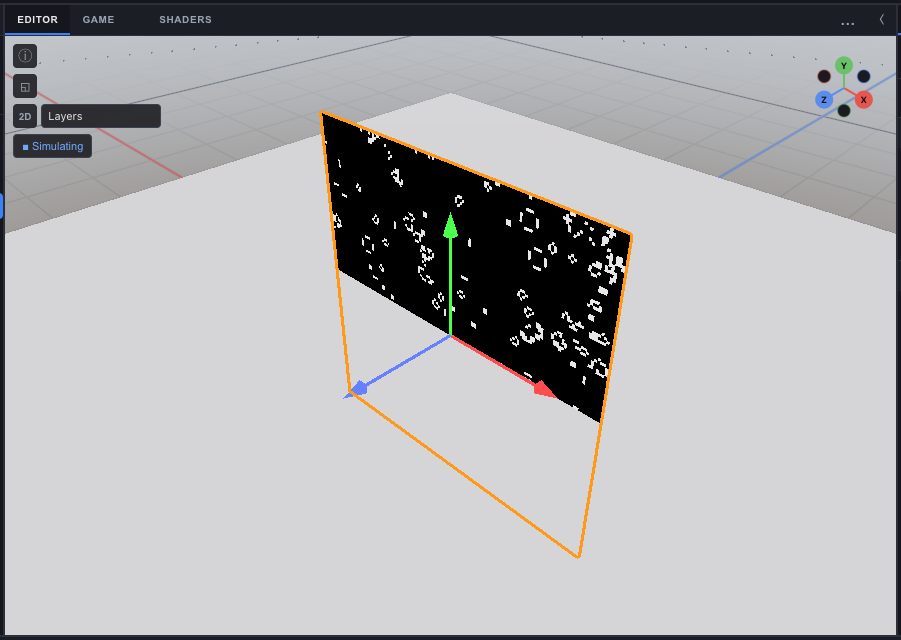
- While editing, only those with Simulate in Scene view run, on an edit-time copy of the fixed clock. The Scene view shows a ▶ Simulate button whenever the scene has a Simulation component; it turns the field on for all of them (one undo step) and reads ■ Simulating while they all run.
Every editor viewport keeps its own GPU copy of each run and catches up to the shared step count, at most 20 steps a frame (SIM_CATCHUP_PER_FRAME); a copy more than 600 steps behind jumps ahead instead of replaying. Only one viewport, the one advancing the simulation, feeds gameplay and Texture Probes.
Scripts: api.simulation
ts
export default class implements ScriptBehavior {
  onStart(api: ScriptApi) {
    const sim = api.simulation(api.entity); // null when the object has no Simulation component
    if (sim) sim.paused = false;
  }
  onUpdate(api: ScriptApi) {
    const sim = api.simulation(api.entity);
    if (sim && sim.step > 600) sim.reset(); // start over every 10 s at 60 Hz
  }
}| Member | Meaning |
|---|---|
reset() | Clear its textures to their clear colours and its step count to 0. |
paused | true holds it: no steps run, no draws are asked for. |
step | Fixed steps since the last Reset (read only). |
Texture Probes
A GPU texture cannot be read by a script on the frame it is written: the copy back to the CPU lands a frame or more later. A Texture Probe makes that delay fixed and the result deterministic.
| Field | Default | Meaning |
|---|---|---|
| Texture | none | The render texture read (rt:<id>), usually one a Simulation writes: a velocity field, a heat map, a mask. |
| Window | 24 | Side of the square of texels copied around the object after every fixed step, clamped to 4–128 and to the texture's size. |
| Bounds | 0, 0, 1, 1 | The world rectangle the texture covers: min X, min Y, max X, max Y. Texel row 0 is at max Y (a camera looking down -Z draws the top of its view into row 0). |
After every fixed step of the Simulation that owns the probed texture, the renderer copies a Window x Window square of texels centred on the object's world X and Y. The script then reads it:
ts
const probe = api.probe(api.entity);           // null without a TextureProbe component
const p = api.getPosition();
const v = probe?.sample(p.x, p.y);              // [r, g, b, a] or null
if (v) api.setVelocity(api.entity, v[0], v[1], 0); // a velocity field pushes the object
sample(x, y) takes world units, samples bilinearly, and reads the window copied Probe delay steps ago (Project Settings > Time, default 2, range 0–16). A point outside the window reads its nearest edge texel, so make Window cover how far the object can move in Probe delay steps. It returns null before the first window has landed (the texture still holds its clear colour then). The last 32 windows per probe are kept.
The fixed clock waits for the probes: before running a step, it checks that every window a script would read at that step has landed, and holds back the steps that would read one that has not. Held steps are owed again next frame, so a slow readback slows a frame down and never changes a result. A Probe delay of 0 waits for every step's readback, so the game runs at most one fixed step a frame; it is a diagnostic setting.
Quality levels
A quality level can scale a render texture's size (0.05–1) and set a Simulation step's passes (1–256) per device. That changes what the Simulation computes, not only how it looks, and switching levels resets the game's Simulations. A game whose outcomes come from a Simulation should check them at every level it ships.
What ships
An exported game carries its render textures, its Simulation assets and, when the project has any Simulation, every compiled update shader as JSON: the player has no graph compiler. The Time settings (fixed rate, max steps, probe delay) ship too. The player runs the same Renderer, the same SimulationStates and the same fixed clock as editor Play, and every Simulation runs from a Reset when the game starts.
Examples
The Hierarchy's Create > 2D menu builds three working Simulations out of ordinary assets, each shown on a quad through an unlit material and running in the Scene view as you edit (Simulate in Scene view on):
| Item | Textures | Steps |
|---|---|---|
| Game of Life | Life: 128 x 128 rgba8unorm, nearest, repeat, double-buffered | A seed graph on Reset (about 30% alive, the same texels every Reset), then the Life rule every step. |
| Ripples | Ripple Heights: 128 x 128 rgba16float, double-buffered; Ripple View: 128 x 128 rgba8unorm | A wave step with a moving source, Repeat 2, into the heights; then a shade step that colours them into the view. |
| Particle Field | Particles: 100 x 100 rgba16float, nearest, double-buffered | A seed graph on Reset and a swirl step; one double-sided quad with Instances from texture draws the 10,000 particles as streaks. |
How it is tested
Two checks drive a real WebGPU device through the shipping Renderer and read the textures back (both part of pnpm test:gpu):
scripts/update-graph-check.ts: every update node's WGSL compiles; Game of Life turns a blinker and wraps at the edges; a Loop blur spreads one bright texel to its 3 x 3 neighbourhood and clamps at the corner; Pass Index, Step, Fixed dt and Texel Size reach the shader;nearest-clampreadsr32floattexel for texel;linear-clampholds the edge texel past the edge whilelinear-repeatwraps.scripts/simulation-check.ts: a copy seeds on Reset and an update step turns a blinker each step; two steps run in order with each step's uniform; Repeat 4 swaps after each pass (Previous + Pass Index sums 0 + 1 + 2 + 3 a step); a Clear step resets its texture every step; anrgba32floattarget keeps a change of 0.001 a step through Previous; a 32-bit float texture on a filtering binding is refused with a message; a paused or caught-up Simulation asks for no draw; probe windows land in order, tagged with their step; a camera step draws its bound camera and the frame alone does not; a frame's several fixed steps each draw with their own transforms.
See also
- Render Textures - the textures Simulations write, formats and Instances from texture
- Simulation panel - editing steps, thumbnails, Reset / Pause / Step once, GPU time
- Fixed clock - the step rate, onFixedUpdate and the per-frame cap
- Shader Graph - the node editor update graphs are built in
- Project Settings - Time (Probe delay) and Quality