
In-app purchases
A game sells things (an unlock, a pack of coins) through api.store: in the mobile app the App Store or Google Play take the payment, and in the editor, Preview and a web export a test store stands in, so you can build and test the whole flow before any store knows the game.
There is no server and no third-party service. The mobile app uses react-native-iap 17.1.0: StoreKit 2 on iOS, Google Play Billing 9 on Android. The stores check every purchase on the phone. Prices are never set in the editor: they come from the stores, in the player's currency.
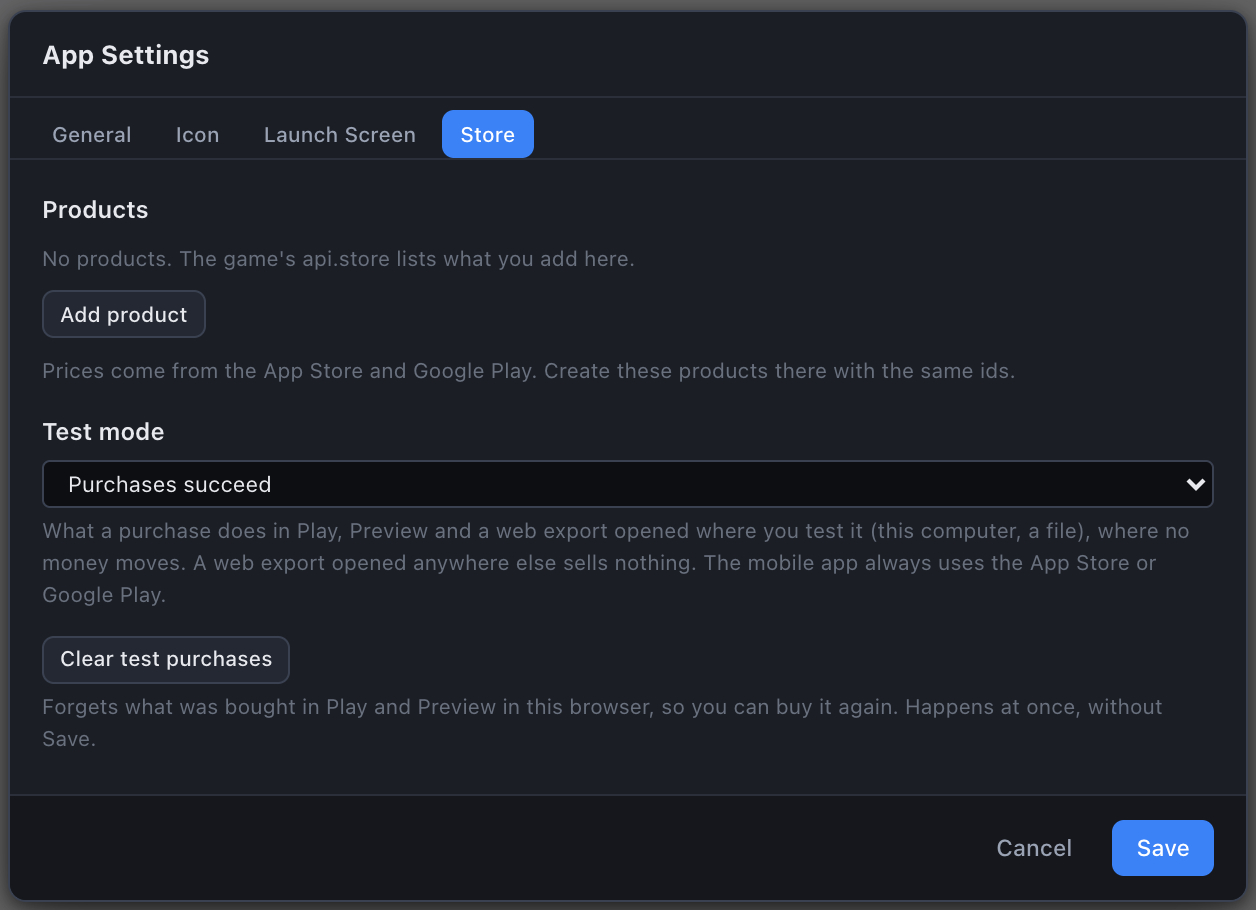
Products in App Settings
Open File ▸ App Settings… and the Store tab. Each product has:
| Field | What it is |
|---|---|
| Key | What the game uses: api.store.buy("unlock"). Lowercase letters, digits and underscores, starting with a letter, at most 40. Unique. |
| Type | Non-consumable (bought once, owned for good: an unlock, a level pack) or Consumable (can be bought again: coins). |
| App Store id | The product id in App Store Connect. Letters, digits, dots and underscores, up to 100. A new product gets <app id>.<key>, for example com.studio.game.unlock. |
| Google Play id | The product id in the Play Console. It follows the App Store id until you edit it apart. Play takes lowercase letters, digits, dots and underscores only, starting with a letter or digit, and keeps ids starting with android.test for itself. |
| Title | The name shown until the store answers with its own, up to 60 characters. |
Add product and Remove edit the list. The hint under it says what matters most: prices come from the App Store and Google Play, so create these products there with the same ids.
Test mode says what a purchase does where there is no real store (Play, Preview, web exports):
| Test mode | buy answers |
|---|---|
| Purchases succeed (default) | "purchased": a non-consumable is then owned |
| Purchases are cancelled | "cancelled" |
| Purchases fail | "failed" |
| Purchases wait (pending), then succeed | "pending", and 3 seconds later the purchase goes through and onChange runs, as an approved Ask to Buy does |
| Store off (unavailable) | "unavailable", and available is false |
Clear test purchases forgets what was bought in Play and Preview in this browser (the awaken.store.test key in localStorage), at once, without Save. A game running in Play or in a Preview tab hears about it through onChange.
The script API
| Member | Signature | Description |
|---|---|---|
available | boolean | A store (real, or the test store) can take purchases right now. |
ready | (): Promise<void> | Resolves once the products and what the player owns are known, or the store is known unavailable. In the mobile app it resolves after 5 seconds at most. |
products | (): { key, title, price, owned, type }[] | Every product App Settings list. price is the store's own string ("£1.99"), or null until it answers; title is the store's name once it answers. |
owns | (key: string): boolean | Whether the player owns the product, as the store reports it. A consumable is never owned. |
buy | (key: string): Promise<"purchased" | "cancelled" | "pending" | "failed" | "unavailable"> | Shows the store's purchase sheet. "pending": the store took it but has not charged yet (an Android payment still going through, an iOS Ask to Buy); onChange runs when it goes through. A buy the store never answers resolves "failed" after 2 minutes. |
restore | (): Promise<{ restored: string[] }> | Asks the store what the player owns. restored holds the keys owned. |
onChange | (handler: () => void): () => void | Runs handler when ownership, a price or a title changes: a pending purchase going through, a restore, a refund, the store's first answer. Returns the unsubscribe. A handler goes with its script, like on. |
ts
export default class Shop implements ScriptBehavior {
  async onStart(api: ScriptApi) {
    const show = () => {
      const unlock = api.store.products().find((p) => p.key === "unlock");
      api.ui.setText("UnlockPrice", unlock?.price ?? "");
      if (api.store.owns("unlock")) api.ui.hide("BuyButton");
    };
    api.store.onChange(show);
    await api.store.ready();
    show();
    api.ui.onClick("BuyButton", async () => {
      const result = await api.store.buy("unlock");
      if (result === "pending") api.ui.setText("ShopNote", "Waiting for approval");
      show();
    });
    // Apple requires a way to restore purchases.
    api.ui.onClick("RestoreButton", async () => { await api.store.restore(); show(); });
  }
}
Ownership comes from the store. Decide what the player owns from api.store.owns, never from the game's own save alone. A game may keep a copy in its save (to show the unlock before the store answers in a web build, say), but the store's answer wins.
Restore Purchases is required by Apple. App Review Guideline 3.1.1 requires a way to restore non-consumable purchases. Give the game a button that calls api.store.restore().
In the mobile app
The mobile export writes the products into the app as storeProducts.ts (with both store ids) and, for testing on iOS, ios/Products.storekit, on every export. The page gets only each product's key, type and title.
- At every launch the shell asks the store what the player owns, and the answer replaces what it knew. The last answer is kept in
Documents/awaken-store.json, next to the save and signed with the save key, so a launch without a network still knows the unlock: the page gets it before its scripts run, then the store's answer. - Every transaction is finished. A consumable is consumed; a non-consumable is acknowledged on Android, where Google refunds a purchase left unacknowledged for 3 days.
- Refunds take the product away the next time the app comes back to the foreground (the shell asks the store again, at most every 30 seconds) or launches.
- One purchase at a time: a second
buywhile the sheet is up answers"failed". - Consumables that complete late (pending, then approved) are finished, but the game is not told: the API has no way to say so. Sell consumables only where a purchase completes at once, or stick to non-consumables.
The mobile project's README ("In-app purchases") has the details, including what a folder made by an older editor needs.
Creating the products in the stores
The ids must match App Settings exactly.
App Store Connect
- Sign the Paid Apps Agreement (Business), with banking and tax. Until it is active no product loads, in the sandbox too.
- Your app ▸ Monetization ▸ In-App Purchases ▸ +: type Non-Consumable (or Consumable), the Product ID set to the App Store id from App Settings, a reference name, a price, and at least one localisation.
- Add a review screenshot and notes, and submit the product with the next app version.
Google Play Console
- Upload a build that has billing in it first (any track; internal testing is enough). The Play Console offers in-app products only after it has seen one. A mobile export's app has billing (
com.android.vending.BILLINGcomes from the billing library). - Monetize ▸ Products ▸ In-app products (One-time products in newer consoles) ▸ Create product: the Google Play id from App Settings, a name, a description and a price. Activate it.
- Settings ▸ License testing: add the Google accounts that test. They buy with test cards and are not charged.
- Testers join the internal testing track and install the app from it, signed in to Google Play with a license tester account.
Testing
| Where | What answers |
|---|---|
| Editor Play, Preview, web exports | The test store, in App Settings' test mode. Prices read £1.99 (test). |
| iOS Simulator or a device, run from Xcode | Xcode's StoreKit testing with ios/Products.storekit: every product at 0.99 US dollars (edit it in Xcode). The sheet is headed "Xcode" and no money moves. |
| iOS device, TestFlight | App Store Connect's sandbox. |
| Android | Google Play, with a license tester, from the internal testing track. |
To use Products.storekit, select it in the scheme: Product ▸ Scheme ▸ Edit Scheme… ▸ Run ▸ Options ▸ StoreKit Configuration ▸ Products.storekit. A folder from a new export already selects it; an update never edits your scheme. Debug ▸ StoreKit ▸ Manage Transactions… lists the purchases and can refund one, approve an Ask to Buy, or delete one so you can buy it again. Set StoreKit Configuration back to None to test against the sandbox.
See also
- App Settings - the dialog the Store tab is part of
- Export for Mobile - the React Native project the store lives in
- ScriptApi Reference - every
api.*member - Scenes & Persistence - saves, which may cache ownership but never decide it