
2D Games
Awaken makes 2D games with the same renderer, physics and scripts as 3D ones: an orthographic camera looks down -Z at the XY plane, sprites and shapes are flat meshes in that plane, and physics can be held to it. This page covers the editor's 2D view, the Shape 2D component, 2D physics, and what is not there yet.
There is no separate 2D renderer. A sprite or a shape is an ordinary transparent mesh drawn by the forward pass, so materials, render layers, render textures and the Volume effects all apply. The UI (HUD, menus) is a separate DOM layer drawn over the canvas: see In-Game UI.
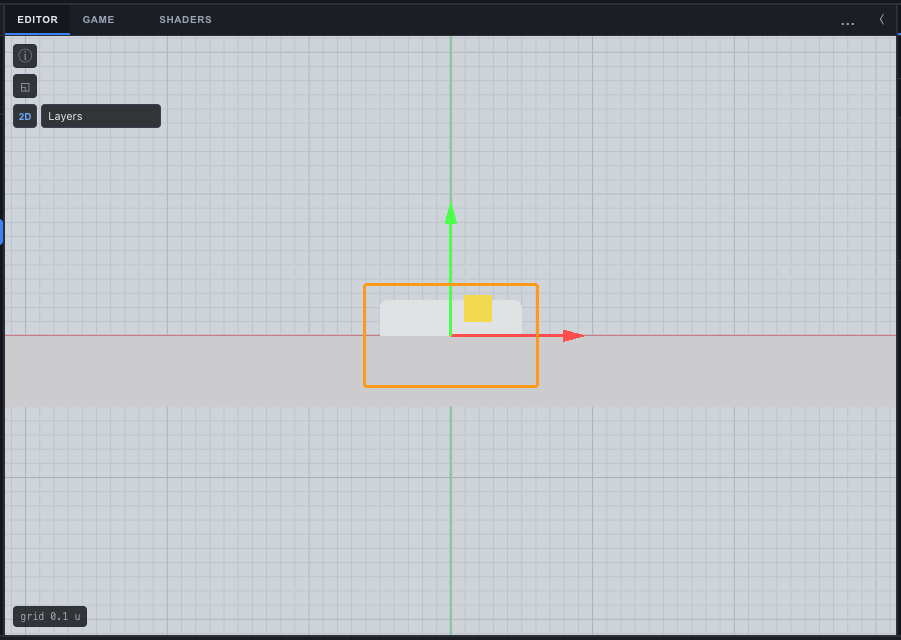
The 2D Scene view
The 2D button in the Scene view's corner switches it to look straight down -Z at the XY plane. In 2D you get:
- an XY grid with its spacing shown,
- pan, and zoom about the cursor,
- 2D move, rotate and scale handles,
- box-select,
- grid snapping, with the cell size set by Cell in the Toolbar.
The choice is saved with the scene (SceneJSON.view2d), so a 2D scene opens in 2D. The player never reads it.
Cameras and sprites
The Hierarchy's create menu has a 2D group:
| Item | What it makes |
|---|---|
| Sprite | A MeshRenderer on the built-in quad mesh (a unit square in XY facing +Z), transparent: true, castShadow: false. Give it a texture in the Inspector. |
| 2D Camera (Orthographic) | An orthographic Camera at z = 10 looking down -Z, orthoSize 5, near 0.1, far 100. |
| Shape 2D > Box, Circle, Capsule | A Shape 2D object (below). |
| Distance Field Camera | An orthographic camera that draws every Shape 2D it sees as signed distance into a render texture. |
| Render Texture Demo, Game of Life, Ripples, Particle Field | Working examples of render textures and Simulations. |
Transparent sprites draw in ascending MeshRenderer.sortOrder; equal values keep the engine's order. One texture per sprite: there are no sprite atlases or UV sub-rects for world sprites yet, and no 9-slice outside the UI.
To keep a board whole on every screen, set the camera's Fit to contain, and to fill an upright phone with a landscape board, its Turn to portrait. Both are on Camera. Turn a pointer into a world point with api.screenToWorld(px, py), which follows Fit and the turn.
Shape 2D
A Shape2D component (packages/render/src/shape2d.ts) is a box with rounded corners, a circle or a capsule in its object's XY plane.
| Field | Default | Meaning |
|---|---|---|
kind | "box" | box, circle or capsule (a horizontal bar with round ends) |
halfWidth | 0.5 | Half the outer width (box and capsule), local units |
halfHeight | 0.5 | Half the outer height (box), local units |
radius | 0.05 | The box's corner radius, the circle's radius, or the capsule's half thickness |
feather | 0.002 | Stored with the shape, but not read by anything: the soft edge comes from the Shape Fill material's own Feather property |
The shape draws itself on a quad it builds: its MeshRenderer's mesh is shape2d:<hx>:<hy>:<r>, one mesh per distinct size, reaching 0.1 local units past the shape. The quad's vertex data carries the shape (its UVs hold the half size), so any material can rebuild it with the Shape Distance node.
Create > 2D > Shape 2D adds the project's Shape Fill material the first time: a shader graph the project owns and can edit. It is unlit and alpha-blended, takes its colour and opacity from the Object Color node (the object's MeshRenderer colour and opacity), and fades over its Feather property at the edge.
Limits, stated plainly:
- A shape resized while the game runs keeps its old mesh in an exported game. The editor re-points a resized shape at a new quad (
syncShapes2D); the player does not run that step, so change Shape 2D sizes in the editor, not from a script. - Every size a shape is ever given leaves its quad in the project as a mesh asset.
- Sizes are local units: keep the object's scale at 1 for a distance, or a collider, in world units.
Physics in 2D
Turn on Project Settings > Time > Physics > 2D (TimeSettings.physics2D, off by default). Dynamic bodies then move in X and Y only and turn about Z only, and a velocity you set has its Z dropped. Static and kinematic bodies are unaffected. Physics itself is still Rapier in 3D, held to the plane.
A Collider shape of kind Shape 2D (shape2d) takes its size from the object's Shape2D component: a circle becomes a ball, a box or capsule a box rounded by its radius, half a unit deep in Z.
Four Collider fields, all optional and left out of a save at their defaults, matter most for 2D games:
| Field | Default | Meaning |
|---|---|---|
layer | 0 | The collision layer, 0 to 15 |
collidesWith | 65535 | Mask of the layers this collider collides with: bit n is layer n. Two colliders meet only when each one's mask includes the other's layer. It is a plain number field in the Inspector. |
oneWay | false | A body on the object's local +Y side collides with it; a body on the other side passes through. A platform you jump up through, a flap that lets cargo one way. |
friction | 0.5 | Surface friction: 0 slides freely, 1 grips |
Scripts read a dynamic body's velocity with api.getVelocity(entity) (null for anything that is not a dynamic body) and set it with api.setVelocity(entity, x, y, z). Contacts reach onCollision, onCollisionEnter and onCollisionExit with the other entity only: no contact normal or impulse.
What 2D physics does not do yet (packages/runtime/src/physics/runner.ts, rapier.ts):
api.moveAndSlidenever uses a Shape 2D: the character takes its collider's first shape as a primitive.- The character controller ignores collision layers and one-way platforms.
api.raycastignores collision layers.- A Shape 2D collider does not follow the object's Transform scale.
Many 2D games, grid puzzles especially, need no physics engine at all: moving pieces in a script over a grid is simpler and exactly repeatable.
See also
- Camera - orthographic projection, Fit and the portrait turn
- In-Game UI - HUDs and menus drawn over a 2D game
- Colliders - collider shapes and fields
- Shader Graph - editing Shape Fill and Shape Distance
- Prefabs - pieces placed and spawned as linked prefabs