
Render Textures
A render texture is a project asset that a camera draws into or a Simulation writes, and that any texture slot can then sample by the id rt:<id>, in the Scene view, the Game view and the exported player.
What a render texture is
An ordinary texture is pixels you import. A render texture is a description: a size, a texel format and how it is sampled. The GPU texture behind it is made by the renderer the first time something needs it, and its contents are whatever the last pass wrote. Uses include:
- a security-camera screen or a mirror: a second camera draws the scene into it, and a quad in the scene shows it;
- a minimap: an orthographic camera looking down draws a few render layers into it;
- simulation state: a heat map, a height field or 10,000 particle positions that an update graph rewrites every fixed step;
- a mask or a signed-distance field: a camera with an Override material draws every object it sees with one material.
The description lives in packages/render/src/renderTexture.ts (RenderTextureDesc); the GPU side is RenderTargets in renderTargets.ts.
Fields
| Field | Default | Meaning |
|---|---|---|
| Name | Render Texture N | Display name. The asset id (rt1, rt2, ...) is what references store. |
| Width, Height | 256 | Texels, an integer from 1 to 4096 (RT_MAX_SIZE). |
| Format | rgba8unorm | The texel format, see Formats. |
| Filter | linear | linear or nearest: how a surface sampling it reads between texels. Forced to nearest for the 32-bit float formats. There are no mipmaps. |
| Address | clamp | clamp, repeat or mirror: what a sample outside 0..1 reads. |
| Double buffered | off | Two textures instead of one: writers draw into the back half while readers sample the front half (the previous frame or step), then the halves swap. |
| Clear colour | 0, 0, 0, 1 | Linear RGBA the texture holds before anything draws into it, and what a Clear step or a Reset writes. Not clamped, so a float texture can be cleared to 4 or -1. |
Formats
| Format | Bytes per texel | A surface material can sample it | A camera can blend into it |
|---|---|---|---|
rgba8unorm | 4 | yes | yes |
rgba16float | 8 | yes | yes |
rg16float | 4 | yes | yes |
r16float | 2 | yes | yes |
r32float | 4 | no | no |
rgba32float | 16 | no | no |
The float formats keep values above 1 and below 0, which is what simulation state needs. The two 32-bit float formats keep full float precision (a particle position nudged a little every step) but are not filterable without an optional device feature the renderer never requests, so:
- a surface material cannot sample one; the texture slot pickers do not list them;
- an update graph reads one with Load Texel or a
nearest-clampsampler; a linear sampler on one is refused with a console message naming the graph and the texture, before it reaches the GPU; - it can be a MeshRenderer's Instances from texture (see below);
- a camera draws into it without blending.
A saved render texture whose format is not one of these six loads as rgba8unorm and logs render texture "<name>": "<format>" is not a render texture format (...) in the console. Creating one with such a format from the editor is refused outright, so a format is never swapped silently.
Creating and inspecting one
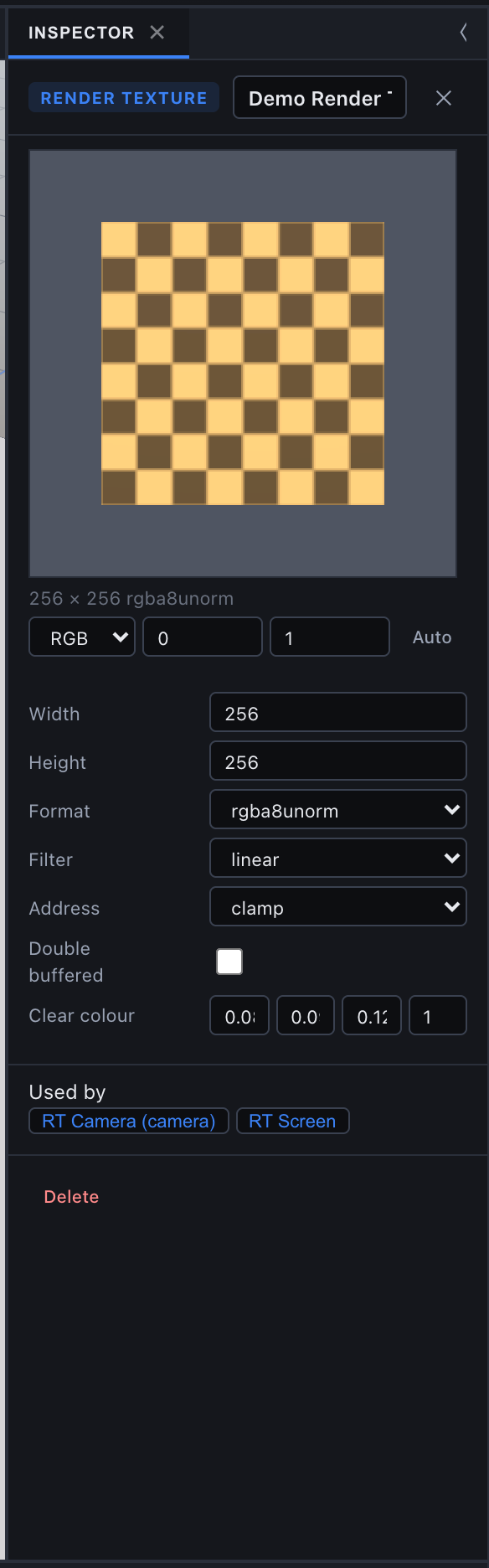
In the Asset Browser, the Render Textures tab (and All) has + New Render Texture. It creates Render Texture N at 256 x 256 rgba8unorm, linear, clamp, single-buffered, cleared to opaque black, and opens it in the Inspector.
The Render Texture Inspector shows:
- the fields above, each change one undo step;
- a live thumbnail read back from the Scene view's GPU: every 100 ms up to 512 x 512, every 500 ms up to 2048 x 2048, otherwise every 2 s. A channel select (RGB, R, G, B or A), Min and Max (the values shown as black and white) and Auto (set Min and Max to the texture's range in that channel) let you read float data. Hovering the thumbnail shows the texel coordinate and its four values;
- Used by: the cameras, objects and materials that reference it, each a button that selects or opens it;
- Delete.
Before anything uses the texture, the thumbnail area says it is not allocated yet and shows a swatch of the clear colour. With no Scene view open it asks you to open one, since the readback comes from that view's renderer.
Allocation
Nothing is created on the GPU until a camera draws into the texture or a surface samples rt:<id>, so a project full of unused render textures costs no GPU memory. Each allocated texture gets:
- one texture, or two when double-buffered;
- a
depth24plusdepth texture at its size, used by camera passes and cleared every pass.
Changing any field frees the GPU textures; they are made again, cleared, at the next reference. Quality levels can scale a render texture's width and height per device.
A camera drawing into one
Set a Camera's Target texture to a render texture and it draws there instead of the screen. A camera with a target is never the screen camera, even when its texture has been deleted (it then draws nowhere). See Camera for the fields; in short:
| Field | Default | Meaning |
|---|---|---|
| Target texture | none | The render texture, stored as rt:<id>. |
| Culling mask | every layer | Which render layers it draws. |
| Clear | on | Clear to Clear color before drawing. Off keeps the previous contents, which is how a trail or accumulation is built. |
| Clear color | 0, 0, 0, 1 | Linear, unclamped. |
| Order | 0 | Target cameras draw in ascending Order, then by entity, all before the screen pass. |
| Override material | none | A material every object this camera draws is drawn with instead of its own. Merged static batches are not drawn by an override camera. |
A target camera's pass is the forward colour pass alone: no sky, grid, particles, gizmos, SSAO or post, single-sample, and no sun (cascade) shadows. It draws opaque then transparent objects in the main pass's order, with pipelines built for the texture's format. Its projection uses the texture's aspect ratio, so an orthographic camera with Fit contain frames inside the texture.
Sampling your own target. WebGPU forbids a pass to sample the texture it renders into. On a single-buffered texture the draws that sample it (as albedo, normal map, material texture or instance texture) are skipped in that camera's pass, and the console says once: Camera "<name>" samples its own render texture "<texture>"; those draws are skipped in its pass. Turn on Double buffered to read the previous frame. On a double-buffered texture those draws read the front half, the previous frame. With Clear off, the front half is copied into the back half before the pass, so the camera draws over what the texture showed.
In the editor, selecting a camera with a target texture shows the texture itself in the camera-preview inset, fitted to its aspect.
Showing one in the scene
Every texture slot picker lists the project's sampleable render textures after its ordinary textures, as <name> (render texture), and a render texture dragged from the Asset Browser drops on any texture field. The slots include:
- a MeshRenderer's Texture (albedo) and Normal texture, so a Sprite or any mesh can show one;
- a material's texture parameters in the Shader Editor.
Update graphs read render textures by the same rt:<id> (see Simulations).
A surface samples the front half with a sampler that follows the texture's Filter and Address.
Instances from texture
A MeshRenderer's Instances from texture draws its mesh once per texel of a render texture, in one draw call; Instance count caps the number (0 = one per texel). Instance i reads texel (i mod width, i / width). What a texel means is up to the object's material: the shader graph nodes Instance Texel (the texel's four values) and Instance Index (the instance number) place, scale, colour and fade each copy. A Simulation writing that texture every step gives GPU particles or boids.
- It needs a MeshMaterial; without one the object draws once.
- Instanced objects cast no shadows and are never culled by their mesh bounds.
- It reads
r32floatandrgba32floattextures, which surfaces cannot sample.
Create > 2D > Particle Field builds an example: a Simulation that swirls 10,000 particles in a 100 x 100 rgba16float texture, drawn as 10,000 streaks by one double-sided quad.
Render layers
Render layers decide which camera draws which object. There are 32, numbered 0 to 31; layer 0 is always Default, and the others are named in Project Settings > Render layers (names are for you; the number is what the project stores).
MeshRenderer.renderLayersis the object's mask: layer n is bit value2^n, so Default is1, layer 1 is2, layer 2 is4. The default is1(Default).0puts it on no layer, and no camera draws it.Camera.cullingMaskis the camera's mask, default every layer (4294967295).- A camera draws an object when the two masks share a bit.
In the Inspector both fields are a mask picker: Everything, Nothing, one checkbox per named layer, and Edit layer names..., which opens Project Settings.
Render layers decide what is drawn, not what casts shadows: an object casts the sun's shadow whatever its layers. They are separate from light layers, which decide which lights reach a surface.
Where the masks apply:
- the screen camera's pass, every target camera's pass, the camera-preview inset;
- the Scene view's own Layers menu, which hides layers in that view only; click-select and box-select skip hidden layers;
- static batching only merges objects on Default alone, so a merged batch is drawn exactly when a camera's mask includes layer 0;
- GPU culling reads no masks, so a frame whose screen mask is narrower than every layer culls on the CPU.
Render Texture Demo
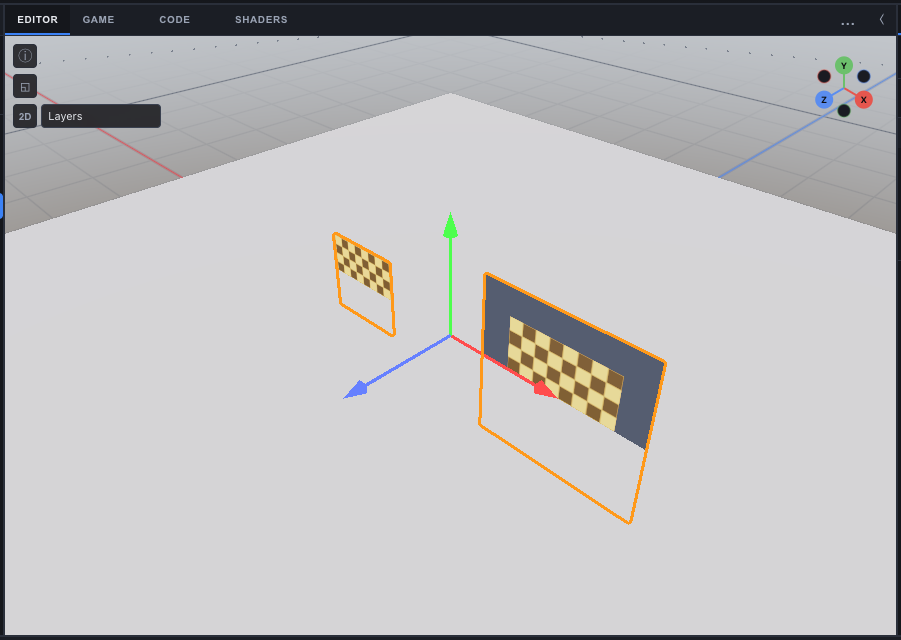
Create > 2D > Render Texture Demo (Hierarchy create menu) builds a working setup from ordinary project content, as one undo step:
- a render texture Demo Render Texture, 256 x 256
rgba8unorm, cleared to a dark blue-grey; - a spinning checker quad (a
Spinscript) on its own render layer,RT Demo: an existing layer of that name, else the first unnamed layer from 1 to 31, which it renames; - a camera whose Culling mask is that layer only and whose Target texture is the render texture;
- a screen quad on Default that shows the texture through an unlit material.
The main camera never sees the spinning quad (it is on another layer), only its picture on the screen quad.
Where render textures run
- Scene view and Game view. Each editor viewport has its own renderer and its own copy of every render texture. Target cameras draw in both while you edit, without Play.
- Exported player. Render textures, render layer masks and target cameras ship in the game file (render textures are written whole into the
SceneFile) and the player runs the sameRenderer. - Readback. The editor reads a texture back for the Inspector thumbnail and the Simulation panel. Scripts read one through a Texture Probe.
See also
- Simulations - update graphs, Simulation assets and Texture Probes that write and read render textures
- Camera - the Target texture fields and the screen camera
- Simulation panel - live thumbnails of a Simulation's textures
- Project Settings - naming render layers
- 2D Games - sprites that show a render texture