
Paths
A Path turns an object's children into the points of a path: a racing line for AI cars, a patrol route, a camera track. You shape it in the Scene view by moving the points, and a script follows it.
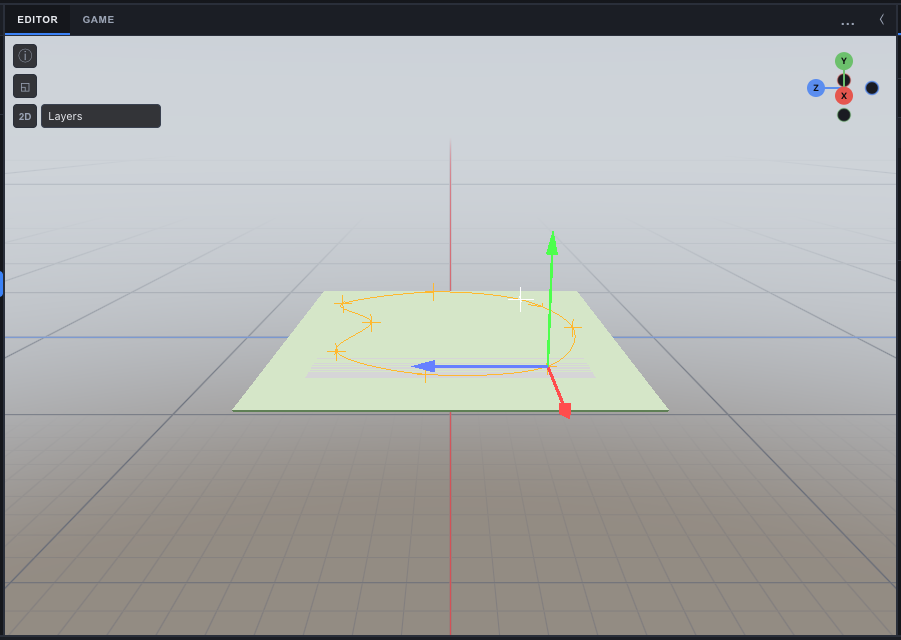
Making one
- Create an empty object (Create ▸ Empty) and add a Path component to it in the Inspector.
- Add children to it: each child is a point. Their order in the Hierarchy is the order the path runs in.
- Move the points with the gizmo. Reorder them to change the order; add or delete one to add or remove a point.
The editor draws the path in the Scene view all the time, and in full colour while the path or one of its points is selected. Each point has a cross (the first one white, so you can see where the path starts) and an arrowhead on the first stretch shows which way it runs. In the Game view the path is drawn while Physics debug is on, so you can watch something follow it.
| Field | Default | What it does |
|---|---|---|
closed | on | On: a loop, the last point joins the first (a race track, a patrol circuit). Off: it ends at the last point. |
smooth | on | On: a smooth curve through every point (a Catmull-Rom spline, which passes through each one). Off: straight lines from point to point. |
color | amber | The colour the editor draws it in. Give each path its own when a scene has several. |
Following one from a script
A Path is data: it does nothing on its own. A script reads the points (the path's children, in order) and samples the curve between them. The editor draws a uniform Catmull-Rom spline, so a script using the same formula follows exactly what you see:
ts
export default class implements ScriptBehavior {
  path: Entity;   // the object with the Path
  speed = 4;      // m/s
  s = { t: 0 };

  onUpdate(api: ScriptApi, dt: number) {
    const pts = api.world.getChildren(this.path).map((c) => api.getPositionOf(c)!);
    const n = pts.length;
    if (n < 2) return;
    this.s.t = (this.s.t + dt * this.speed / 10) % n;          // about 10 m between points
    const i = Math.floor(this.s.t), t = this.s.t - i;
    const p0 = pts[(i - 1 + n) % n], p1 = pts[i], p2 = pts[(i + 1) % n], p3 = pts[(i + 2) % n];
    const f = (a: number, b: number, c: number, d: number) =>
      0.5 * (2 * b + (-a + c) * t + (2 * a - 5 * b + 4 * c - d) * t * t + (-a + 3 * b - 3 * c + d) * t * t * t);
    api.setPosition(f(p0.x, p1.x, p2.x, p3.x), f(p0.y, p1.y, p2.y, p3.y), f(p0.z, p1.z, p2.z, p3.z));
  }
}
That moves at a speed that varies with the spacing of the points. For an even speed, sample the curve finely once, add up the distances between samples, and move along that distance instead: the car lab's race AI does this, and plans its speed from how sharply the path bends.
In engine code, samplePath(points, closed, smooth, steps) in @awaken/runtime returns the same curve as a list of points.
See also
- Transforms & Hierarchy - the points are children, ordered as in the Hierarchy
- Scripting API -
getChildren,getPositionOf,setPosition - Debug Overlays - Physics debug, which draws paths in the Game view